
May 23, 2026
Implementing a simple D-Bus service
Reading an existing D-Bus API is useful. But sooner or later, your embedded daemon needs to expose its own API too.
In the previous posts we looked at the D-Bus mental model and then explored a real API exposed by systemd. This post is about that next step. We will implement a small D-Bus service in C++ using sdbus-c++. The service will expose one object, one interface, two methods and one signal. Small enough to understand, but close enough to the shape of a real embedded service.
Note
This article is the third part of the D-Bus series. It builds on the basic D-Bus vocabulary from the earlier posts: bus name, object path, interface, method and signal.
- How D-Bus works in Embedded Linux – start here if you want the mental model: buses, services, objects, interfaces, methods, properties and signals.
- D-Bus Introspection in Practice – read this next if you want to inspect a real D-Bus API exposed by
systemdfrom the command line.
What we are going to build
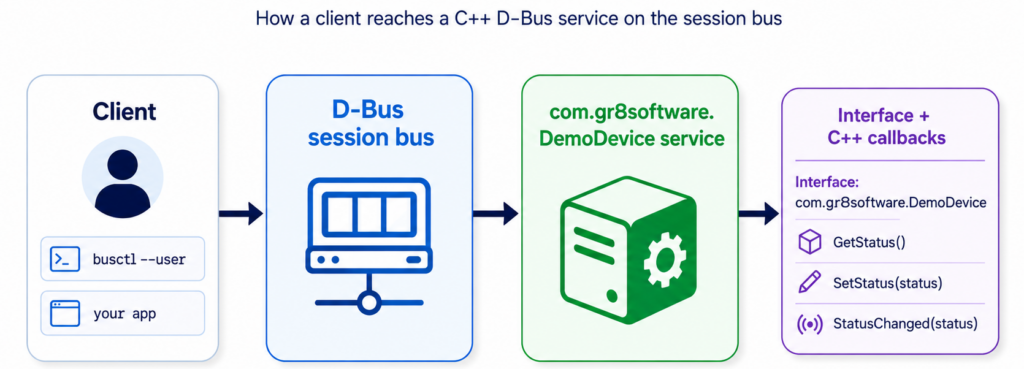
Our example service will pretend to be a tiny device daemon. It keeps a simple status string and allows clients to read or update it.
- Service name:
com.gr8software.DemoDevice - Object path:
/com/gr8software/DemoDevice - Interface:
com.gr8software.DemoDevice - Methods:
GetStatus()andSetStatus(status) - Signal:
StatusChanged(status)
This is intentionally small. In a real product, the status could come from hardware, a state machine, a watchdog, an update manager or another subsystem. For the first service, the important part is not the business logic. The important part is how the D-Bus object is exported.
Why use the session bus first
Most embedded services eventually belong on the system bus. That is where system-level daemons usually expose their APIs. But for a first local experiment, the session bus is more convenient because it avoids system bus policy files.
So in this article we start on the session bus. The D-Bus model is the same. The service still owns a name, exposes an object path, implements an interface and receives method calls. Later, moving the same idea to the system bus mainly means adding a system bus policy and usually a systemd unit.
Tip
Use the session bus while learning and prototyping. Move to the system bus when the service becomes a real system daemon and other users or system components need to access it.
Project layout
We only need two files:
dbus-demo-service/
|-- CMakeLists.txt
`-- main.cpp
The example uses sdbus-c++, a modern C++ wrapper around sd-bus. It keeps the code much smaller than using the low-level C API directly.
CMake file
Create CMakeLists.txt:
cmake_minimum_required(VERSION 3.16)

project(dbus_demo_service LANGUAGES CXX)

set(CMAKE_CXX_STANDARD 17)
set(CMAKE_CXX_STANDARD_REQUIRED ON)
set(CMAKE_CXX_EXTENSIONS OFF)

find_package(sdbus-c++ 2.0 REQUIRED)

add_executable(dbus-demo-service main.cpp)

target_link_libraries(dbus-demo-service
    PRIVATE
        SDBusCpp::sdbus-c++
)
There is nothing D-Bus-specific here except linking with sdbus-c++. The interesting part is in main.cpp.
The service code
Create main.cpp:
#include <sdbus-c++/sdbus-c++.h>
#include <iostream>
#include <string>


namespace
{
// D-Bus identifiers clients use to find this service, object, and interface.
constexpr const char* SERVICE_NAME = "com.gr8software.DemoDevice";
constexpr const char* OBJECT_PATH = "/com/gr8software/DemoDevice";
constexpr const char* INTERFACE_NAME = "com.gr8software.DemoDevice";
}

int main()
{
    try
    {
        // Keep the device state in memory for this simple demo service.
        std::string status = "idle";

        // Own a well-known name on the user's session bus.
        auto connection = sdbus::createSessionBusConnection(
            sdbus::ServiceName{SERVICE_NAME});

        // Export one object at OBJECT_PATH. Methods and signals are attached below.
        auto object = sdbus::createObject(
            *connection,
            sdbus::ObjectPath{OBJECT_PATH});

        // Define the public D-Bus API for com.gr8software.DemoDevice.
        object->addVTable(
            // Return the current in-memory status string.
            sdbus::registerMethod("GetStatus")
                .implementedAs([&status]() {
                    return status;
                }),

            // Update the status and notify subscribers that it changed.
            sdbus::registerMethod("SetStatus")
                .implementedAs([&status, &object](const std::string& newStatus) {
                    if (newStatus.empty())
                    {
                        // Send a D-Bus error back to the caller instead of accepting
                        // a value that would make the demo state ambiguous.
                        throw sdbus::Error(
                            sdbus::Error::Name{"com.gr8software.DemoDevice.Error.InvalidStatus"},
                            "Status must not be empty");
                    }

                    status = newStatus;

                    // Broadcast the new value to any clients listening for changes.
                    object->emitSignal("StatusChanged")
                        .onInterface(INTERFACE_NAME)
                        .withArguments(status);
                }),

            // Advertise the signal signature so clients can introspect it.
            sdbus::registerSignal("StatusChanged")
                .withParameters<std::string>("status"))
            .forInterface(sdbus::InterfaceName{INTERFACE_NAME});

        std::cout << "Service is running on the session bus\n";
        std::cout << "Service name: " << SERVICE_NAME << '\n';
        std::cout << "Object path:  " << OBJECT_PATH << '\n';

        // Start processing incoming D-Bus calls. This blocks until the service exits.
        connection->enterEventLoop();
    }
    catch (const sdbus::Error& error)
    {
        std::cerr << "D-Bus error: "
                  << error.getName()
                  << " - "
                  << error.getMessage()
                  << '\n';
        return 1;
    }
    catch (const std::exception& error)
    {
        std::cerr << "Error: " << error.what() << '\n';
        return 1;
    }

    return 0;
}
Compile the service
Now configure and build the project:
cmake -S . -B build
cmake --build build
Tip
If CMake cannot find sdbus-c++, you are probably missing the development package, not the runtime library. On Debian or Ubuntu, the package is usually called libsdbus-c++-dev, but check the version before relying on it. This example uses the sdbus-c++ 2.x convenience API, so older 1.x distribution packages will not satisfy find_package(sdbus-c++ 2.0 REQUIRED). If your distribution only provides 1.x, install a newer upstream release or adapt the example to the older API.
sudo apt install -y libsdbus-c++-devIf everything is installed correctly, CMake will produce the executable in the build directory. Run it in one terminal and leave it running:
./build/dbus-demo-serviceYou should see:
Service is running on the session bus
Service name: com.gr8software.DemoDevice
Object path:  /com/gr8software/DemoDevice
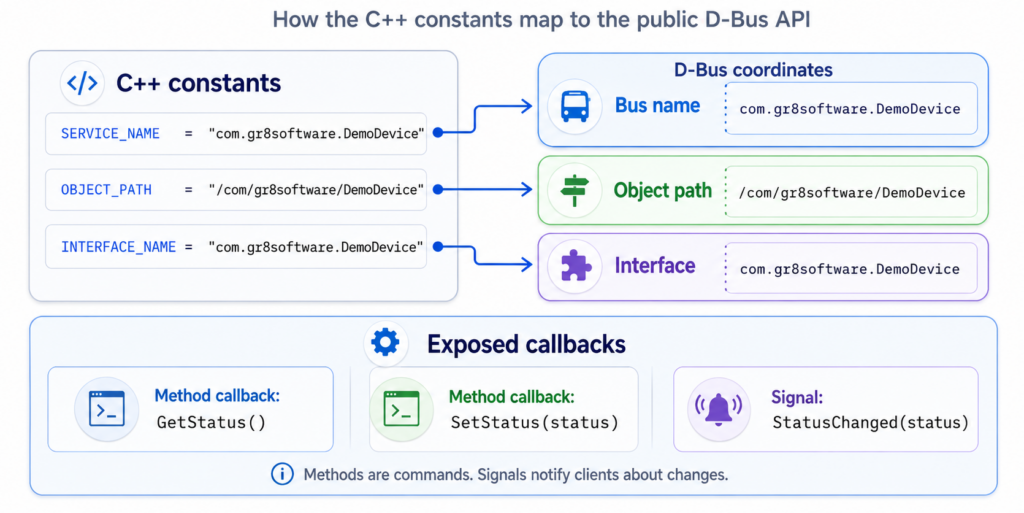
This is already a working service. It connects to the session bus, requests the well-known name com.gr8software.DemoDevice, creates an object at /com/gr8software/DemoDevice, registers an interface and starts the event loop.
The important parts
The first important line creates a bus connection and asks for a public name:
auto connection = sdbus::createSessionBusConnection(
    sdbus::ServiceName{SERVICE_NAME});
This is the name clients will use as the destination. They do not need to know the unique connection name assigned by the bus.
The next part creates the object:
auto object = sdbus::createObject(
    *connection,
    sdbus::ObjectPath{OBJECT_PATH});
The object path is the endpoint exposed by the service. It is not a file. It is not automatically related to your C++ class layout. It is part of your public IPC API.
Then we attach a vtable to the object:
object->addVTable(
    /* methods and signals */)
    .forInterface(sdbus::InterfaceName{INTERFACE_NAME});
This is where the D-Bus interface is exported. In this example the interface contains two methods and one signal.
Finally, the process enters the D-Bus event loop:
connection->enterEventLoop();Without the event loop, the service would own the name and export the object only briefly, then exit. The event loop keeps the process alive and handles incoming messages.
Tip
A D-Bus service is not just a function you call once. It is a process with a bus connection, exported objects and an event loop that receives messages.
Try the service
Keep the service terminal running. The service must stay alive so the commands below can talk to it from another terminal.
Check that the service owns its name
Open another terminal and list names on the session bus:
busctl --user list | grep com.gr8softwareYou should see com.gr8software.DemoDevice. This confirms that the process successfully connected to the bus and requested its well-known name.
Warning
If this command shows nothing, check that the service is still running and that you used --user. In this example the service is on the session bus, not the system bus.
Introspect your own service
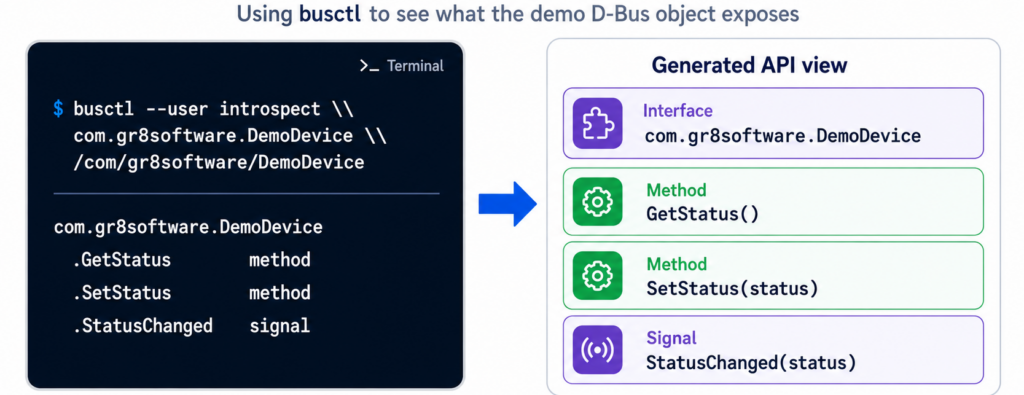
Now inspect the object:
busctl --user introspect \
  com.gr8software.DemoDevice \
  /com/gr8software/DemoDevice
The output should include your custom interface:
com.gr8software.DemoDevice interface - -
.GetStatus                 method    - s
.SetStatus                 method    s -
.StatusChanged             signal    s -
You should also see standard D-Bus interfaces such as org.freedesktop.DBus.Introspectable, org.freedesktop.DBus.Peer and org.freedesktop.DBus.Properties. That is normal. D-Bus tools use those standard interfaces to inspect and interact with objects.
This is the nice part: we wrote C++ code, but clients can discover the exported API through D-Bus introspection. That is exactly the same workflow we used earlier when exploring systemd.
Call the first method
Call GetStatus:
busctl --user call \
  com.gr8software.DemoDevice \
  /com/gr8software/DemoDevice \
  com.gr8software.DemoDevice \
  GetStatus
The service returns the current status:
s "idle"The first s is the D-Bus type signature for a string. The value is the actual method result.
Call a method with an argument
Now call SetStatus. This method takes one string argument, so the busctl call command needs the method signature s and then the value:
busctl --user call \
  com.gr8software.DemoDevice \
  /com/gr8software/DemoDevice \
  com.gr8software.DemoDevice \
  SetStatus \
  s "busy"
Now read the status again:
busctl --user call \
  com.gr8software.DemoDevice \
  /com/gr8software/DemoDevice \
  com.gr8software.DemoDevice \
  GetStatus
The result should now be:
s "busy"This is the simplest possible stateful service. A client calls one method to update state, another method to read it, and the service owns the actual value.
Watch the signal
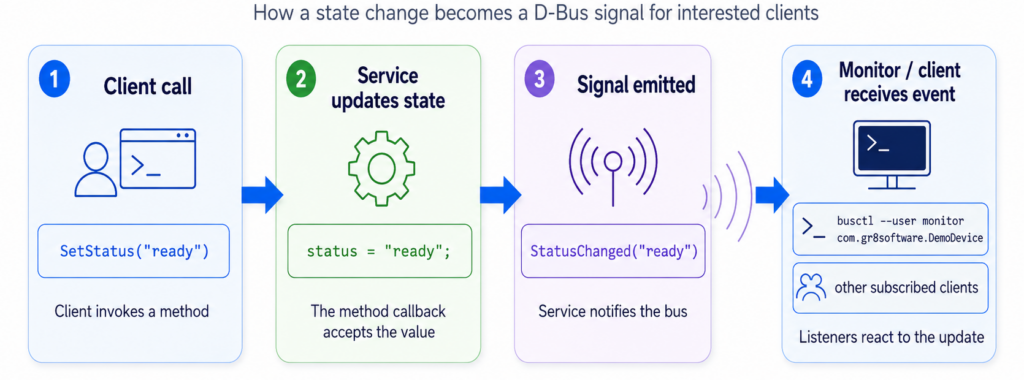
The service emits StatusChanged every time SetStatus accepts a new value. Watch the service from another terminal:
busctl --user monitor com.gr8software.DemoDeviceThen call SetStatus again:
busctl --user call \
  com.gr8software.DemoDevice \
  /com/gr8software/DemoDevice \
  com.gr8software.DemoDevice \
  SetStatus \
  s "ready"
The monitor should show a signal message containing the new status.
This is one of the main reasons D-Bus is useful for local control APIs. Clients do not have to poll forever. They can subscribe to signals and react when something changes.
What happens inside the service
When a client calls SetStatus, the bus delivers a method call message to our process. sdbus-c++ deserializes the string argument and invokes the C++ lambda:
sdbus::registerMethod("SetStatus")
    .implementedAs([&status, &object](const std::string& newStatus) {
        if (newStatus.empty())
        {
            throw sdbus::Error(
                sdbus::Error::Name{"com.gr8software.DemoDevice.Error.InvalidStatus"},
                "Status must not be empty");
        }

        status = newStatus;

        object->emitSignal("StatusChanged")
            .onInterface(INTERFACE_NAME)
            .withArguments(status);
    })
There are three important details here.
- The callback validates the input.
- The service updates its own internal state.
- The service emits a signal after the state changes.
The bus does not know what a valid status is. The bus does not know whether the device is really ready. The bus only routes messages. Your service owns the behavior.
Warning
Do not treat D-Bus as validation or authorization by itself. A D-Bus service still needs to validate arguments, reject invalid states and make security decisions appropriate for the product.
Returning an error
Our service rejects an empty status string:
busctl --user call \
  com.gr8software.DemoDevice \
  /com/gr8software/DemoDevice \
  com.gr8software.DemoDevice \
  SetStatus \
  s ""
The method throws a D-Bus error:
throw sdbus::Error(
    sdbus::Error::Name{"com.gr8software.DemoDevice.Error.InvalidStatus"},
    "Status must not be empty");
On the client side, this is not a normal successful return value. It is an error reply. Good D-Bus APIs should use errors intentionally instead of returning fake status strings such as "ERROR" or "FAILED".
Moving the service to the system bus
For a real embedded daemon, you will usually move from the session bus to the system bus. In code, that starts by changing the connection creation:
auto connection = sdbus::createSystemBusConnection(
    sdbus::ServiceName{SERVICE_NAME});
But that change alone is not enough. The system bus is protected. A normal process cannot just claim arbitrary names and expose arbitrary APIs there. You need a D-Bus policy file that allows the service to own its name and defines who may talk to it.
For a development-only example, a minimal policy may look like this:
<!DOCTYPE busconfig PUBLIC
 "-//freedesktop//DTD D-BUS Bus Configuration 1.0//EN"
 "http://www.freedesktop.org/standards/dbus/1.0/busconfig.dtd">
<busconfig>
  <policy user="root">
    <allow own="com.gr8software.DemoDevice"/>
  </policy>

  <policy context="default">
    <allow send_destination="com.gr8software.DemoDevice"/>
  </policy>
</busconfig>
On many systems such files are installed under /etc/dbus-1/system.d/ or /usr/share/dbus-1/system.d/, depending on distribution policy. In production, be more restrictive than this example.
Warning
The policy above is intentionally simple for learning. Do not copy it blindly into a product. Decide which user should own the service name and which clients should be allowed to call which interfaces.
Common mistakes
When implementing your first service, most problems are small mismatches between the four D-Bus coordinates.
- Using the wrong bus. This example uses the session bus, so commands need
--user. If you move to the system bus, use--systemand add policy. - Changing one string but not the others. The service name, object path and interface are separate values. Keep them consistent in code and command-line calls.
- Forgetting the event loop. Registering an object is not enough. The connection must keep processing messages.
- Not emitting signals after state changes. If clients need to react to state changes, emit a signal from the service when the state changes.
- Designing the D-Bus API from internal classes. D-Bus is a public contract. Do not expose your private C++ object model by accident.
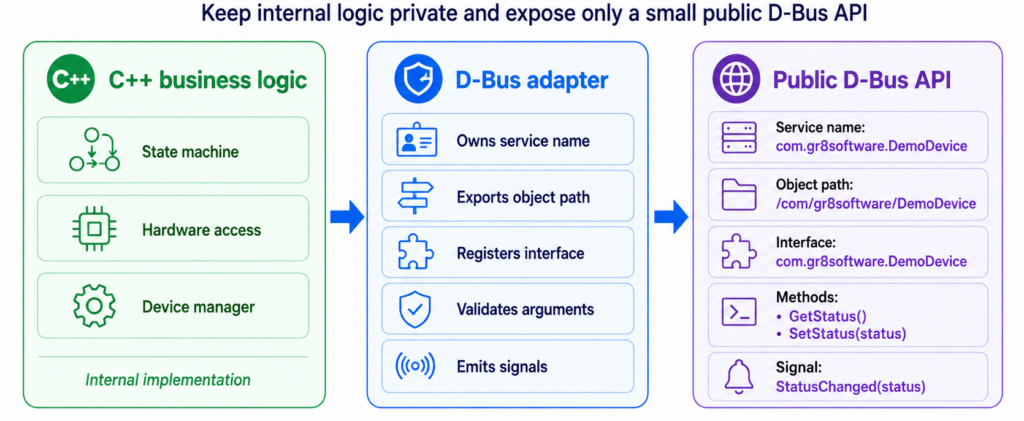
A better shape for real services
The example keeps everything in main.cpp because it is easier to read in a blog post. In real code, split the transport layer from the business logic.
- Keep hardware access and state machines in normal C++ classes.
- Keep D-Bus registration in a small adapter layer.
- Validate all arguments at the D-Bus boundary.
- Emit signals from one clear place after state changes.
- Keep names, object paths and interfaces stable once clients depend on them.
A good D-Bus API should describe the public control surface of your daemon, not the private layout of your code.
The key idea
If you remember only one thing, remember this:
Tip
A D-Bus service is a normal process that owns a bus name, exports objects, implements interfaces and runs an event loop to handle method calls and emit signals.
In this example, the service is tiny, but the structure is the same as in larger embedded daemons. First choose the public API coordinates. Then export an object. Then register methods and signals. Then keep the event loop running.
Once that feels natural, the next step is to make the service feel like a real system component: run it under systemd, put it on the system bus, add a proper D-Bus policy and decide which clients are allowed to call it.